
Scheduler
Properties | Events | Methods
Enables the scheduling, viewing, and management of events or appointments based on specified dates and times.
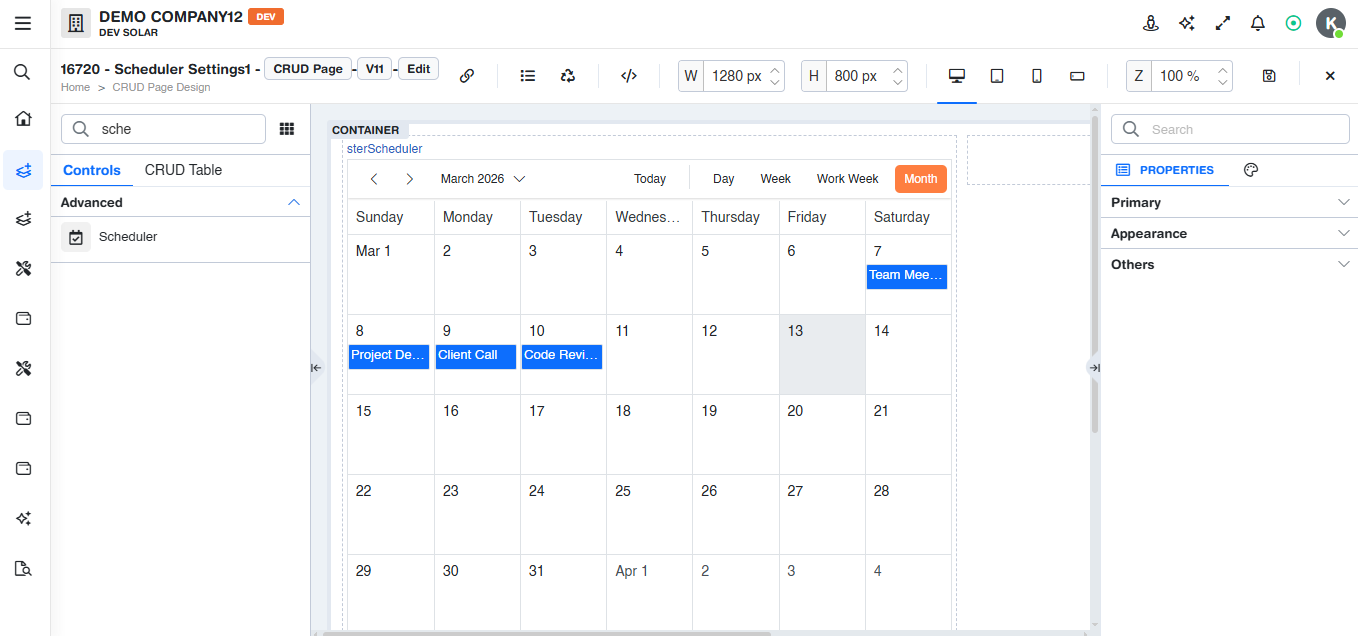
Properties
Custom
Schedule Setting
Defines the configuration options for scheduling and displaying events or appointments.
Enable Context Menu
If a drilldown is assigned, it will be shown in the context menu.
Show Quick Info
The quick information popup will be shown in the calendar if showQuickInfo is true; otherwise, the popup will not be displayed.
Enable Tooltips
Used to enable the tooltip and display additional field information in the Scheduler control.
Default
Defaults to the current date when opening the Scheduler.
Fixed Date
Defaults to a predefined date when the Scheduler is opened.
Earliest Event
Automatically navigates to the date of the earliest scheduled event.
Field Min/Max
Navigates automatically to the minimum or maximum date of the field specified in Field Mapping.
Direction
Specifies the navigation to either the earliest (minimum) or latest (maximum) date.
Field
Specifies the field used to define the start and end times of an event.
Applicable Views
The Scheduler supports the following views: Day, Week, Work Week, Month, and Agenda.
Default View
Sets the initial calendar view, such as Month, Day, or Week.
Field Mapping
Maps each Scheduler property to the matching column name in the data source.
ID
Defines the unique identifier for the event.
Subject
Defines the subject or title of the event.
Start Time
Defines the start date and time of the event.
End Time
Defines the end date and time of the event.
Location
Defines the location where the event takes place.
Description
Defines the description of the event.
Recurrence Rule
Defines the recurring pattern of a Scheduler event.
Recurrence Exception
Defines specific occurrences to be excluded from a recurring event series.
Recurrence ID
Identifies the parent event of a recurring event series.
Tooltip Behavior
Defines how the tooltip is positioned and displayed.
Position
Defines the position of the tooltip.
Opens On
Defines whether the tooltip appears on hover, click, or through a custom trigger.
Width
Defines the width of the tooltip.
Tooltip Fields
Defines the rows displayed inside the tooltip, from top to bottom.
Field
Defines the field displayed in the tooltip.
Label
Defines the label displayed in the tooltip.
Header
Defines whether the field is displayed as the header of the tooltip.
Date
Defines whether the date is displayed in the tooltip.
Format
Defines the tooltip format, such as date, date-time, or time.
Action
A user-initiated action performed through the interface, such as exporting data, refreshing the screen, or navigating to another screen.
Events
Applicable event is On change (Onchange)
Methods
No methods are specified for the Scheduler control.